vim plugin to diff two directories like BeyondCompare by using diff
inspired by will133/vim-dirdiff
-
why another directory diff plugin?
- fully async and queued, works well with tons of files, even for vim 7.3! (by ZFVimJob)
- works well on Windows without
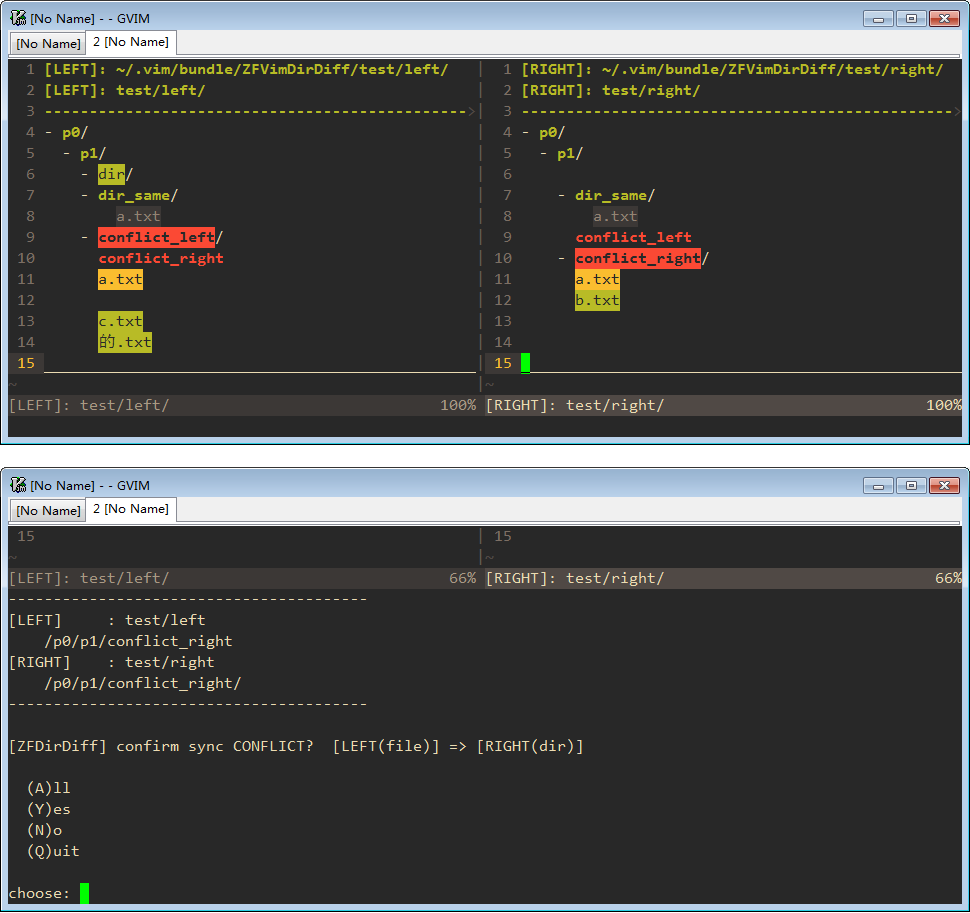
shordiffenv - format the diff result as vertical split file tree view, which should be more human-readable
- more friendly file sync operation using the same mappings as builtin
vimdiff - automatically backup before destructive actions (by ZFVimBackup)
- better file or directory exclude logic (by ZFVimIgnore)
if you like my work, check here for a list of my vim plugins, or buy me a coffee
-
requirement
- vim 8.0 or neovim : recommend, fully async
- vim 7.3 or above : all features work as expected, with some lag due to lack of
job
-
install by vim-plug or any other plugin manager:
Plug 'ZSaberLv0/ZFVimDirDiff' Plug 'ZSaberLv0/ZFVimJob' " required Plug 'ZSaberLv0/ZFVimIgnore' " optional, but recommended for auto ignore setup Plug 'ZSaberLv0/ZFVimBackup' " optional, but recommended for auto backup -
start diff by one of these methods
-
use
:ZFDirDiffcommand to start diff:ZFDirDiff pathA pathBif path contains spaces:
:ZFDirDiff path\ A path\ B :call ZFDirDiff("path A", "path B") -
use
:ZFDirDiffMarkto mark two directories to start diffOpen a file and
:ZFDirDiffMarkand the containing directory will be stored as a diff candidate. Then repeat with another file and you'll be asked to diff the two.:edit pathA/file.vim :ZFDirDiffMark :edit pathB/file.vim :ZFDirDiffMarkOr integrate with your file manager. For vim-dirvish, add ~/.vim/ftplugin/dirvish.vim:
nnoremap <buffer> X :<C-u>ZFDirDiffMark <C-r><C-l><CR>Or for netrw, add ~/.vim/ftplugin/netrw.vim:
nnoremap <buffer> X :<C-u>ZFDirDiffMark <C-r>=b:netrw_curdir<CR>/<C-r><C-l><CR>Then X on two directories.
-
you can also start diff from scrooloose/nerdtree: inside nerdtree window, press
mto popup menu, presszto choosemark to diff, and mark another node again to start diff -
you may also use it as command line diff tool
vim -c 'call ZFDirDiff("path A", "path B")'
sh ZFDirDiff.sh "path A" "path B"
-
-
within the diff window:
- use
DDto update the diff result under cursor - use
oor<cr>to diff current file, or fold/unfold current dir - use
Oto unfold all contents under current dir,xto fold to parent,Xto fold to root - use
cdto make current dir as diff root dir,uto go up for current side, andUto go up for both side - use
DMto mark current file, andDMagain on another file to diff these two files - use
]corDJto move to next diff,[corDKto prev diff, useDj/Dkto move to next / prev diff file - use
doorDHto sync from another side to current side,dporDLto sync from current side to another side - use
ato add new file or dir - use
ddto delete node under cursor - use
DNto mark mutiple files, when done, usedo/DH/dp/DL/ddto sync or delete marked files - use
pto copy the node's path, andPfor the node's full path - use
qto exit diff - you may also want to use ZSaberLv0/ZFVimIndentMove or easymotion/vim-easymotion to quickly move between file tree node
- use
-
within the file diff window:
- it's vim's builtin diff, see
:h difffor more info - use
qto quick file diff and back to owner diff window
- it's vim's builtin diff, see
this plugin should work well without any extra config
for experienced user, here's some configs you may interest
-
let g:ZFDirDiff_autoBackup = 1: whether perform auto backup, see https://github.com/ZSaberLv0/ZFVimBackup -
let g:ZFDirDiff_ignoreEmptyDir = 1: whether ignore empty dir -
let g:ZFDirDiff_ignoreSpace = 0: whether ignore empty lines and spaces (not supported for python backend) -
let g:ZFIgnoreOption_ZFDirDiff = {...}: ignore options, see https://github.com/ZSaberLv0/ZFVimIgnorelet g:ZFIgnoreOption_ZFDirDiff = { \ 'bin' : 0, \ 'media' : 0, \ 'ZFDirDiff' : 1, \ }
let g:ZFDirDiffKeymap_update = []: update entire diff windowlet g:ZFDirDiffKeymap_updateParent = ['DD']: update diff under cursorlet g:ZFDirDiffKeymap_open = ['<cr>', 'o']: toggle dir open or open file difflet g:ZFDirDiffKeymap_foldOpenAll = []: open all node under cursor, including same fileslet g:ZFDirDiffKeymap_foldOpenAllDiff = ['O']: open all diff node under cursorlet g:ZFDirDiffKeymap_foldClose = ['x']: close nodelet g:ZFDirDiffKeymap_foldCloseAll = ['X']: close all nodelet g:ZFDirDiffKeymap_goParent = ['U']: make both left and right diff window go to parent dirlet g:ZFDirDiffKeymap_diffThisDir = ['cd']: change current side's root to node under cursorlet g:ZFDirDiffKeymap_diffParentDir = ['u']: change current side's root to parentlet g:ZFDirDiffKeymap_markToDiff = ['DM']: mark node under cursor, mark again to diff with two marked nodelet g:ZFDirDiffKeymap_markToSync = ['DN']: mark one or more nodes, to sync mutiple nodes at oncelet g:ZFDirDiffKeymap_quit = ['q']: quit difflet g:ZFDirDiffKeymap_diffNext = [']c', 'DJ']: jump to next visible difflet g:ZFDirDiffKeymap_diffPrev = ['[c', 'DK']: jump to prev visible difflet g:ZFDirDiffKeymap_diffNextFile = ['Dj']: jump to next diff file, auto open closed dirlet g:ZFDirDiffKeymap_diffPrevFile = ['Dk']: jump to prev diff file, auto open closed dirlet g:ZFDirDiffKeymap_syncToHere = ['do', 'DH']: sync nodes from there to herelet g:ZFDirDiffKeymap_syncToThere = ['dp', 'DL']: sync nodes from here to therelet g:ZFDirDiffKeymap_add = ['a']: add new node, end with/to add dirlet g:ZFDirDiffKeymap_delete = ['dd']: delete selected nodeslet g:ZFDirDiffKeymap_rename = ['cc']: rename selected nodelet g:ZFDirDiffKeymap_getPath = ['p']: get relative path of node under cursorlet g:ZFDirDiffKeymap_getFullPath = ['P']: get absolute path of node under cursor
let g:ZFDirDiffKeymap_quitFileDiff = ['q']: quit file diff, and go back to its owner diff window
let g:ZFDirDiffUIChar_dir_prefix_closed = '+ 'let g:ZFDirDiffUIChar_dir_prefix_opened = '~ 'let g:ZFDirDiffUIChar_dir_postfix = '/'let g:ZFDirDiffUIChar_file_prefix = ' 'let g:ZFDirDiffUIChar_file_postfix = ''let g:ZFDirDiffUI_tabstop = 2let g:ZFDirDiffUI_autoOpenSingleChildDir = 1let g:ZFDirDiffUI_showSameDir = 1let g:ZFDirDiffUI_showSameFile = 1
highlight default link ZFDirDiffHL_Header Title
highlight default link ZFDirDiffHL_Tail Title
highlight default link ZFDirDiffHL_DirChecking SpecialKey
highlight default link ZFDirDiffHL_DirSame Folded
highlight default link ZFDirDiffHL_DirDiff DiffAdd
highlight default link ZFDirDiffHL_FileChecking SpecialKey
highlight default link ZFDirDiffHL_FileSame Folded
highlight default link ZFDirDiffHL_FileDiff DiffText
highlight default link ZFDirDiffHL_DirOnlyHere DiffAdd
highlight default link ZFDirDiffHL_FileOnlyHere DiffAdd
highlight default link ZFDirDiffHL_ConflictDirHere ErrorMsg
highlight default link ZFDirDiffHL_ConflictDirThere WarningMsg
highlight default link ZFDirDiffHL_MarkToDiff Cursor
highlight default link ZFDirDiffHL_MarkToSync Cursor
-
Q: screen keeps blink when diff updating in background
A: unfortunately, I have no idea for how to solve this issue, mainly because of
matchadd()must inside proper window, causing frequent window switching -
Q: use as
git difftool --dir-diffA: #45
add these to your
.gitconfig[alias] dirdiff = difftool --ignore-submodules --dir-diff --symlinks --tool=vimdirdiff [difftool "vimdirdiff"] cmd = vim -f '+next' '+execute "ZFDirDiff" argv(0) argv(1)' $LOCAL $REMOTE


