



Highly Performant, Modular and Memory Safe
Ingestion, Inference and Indexing in Rust 🦀
Python docs »
Rust docs »
Benchmarks
·
FAQ
·
Adapters
.
Collaborations
.
Notebooks
EmbedAnything is a minimalist, yet highly performant, modular, lightning-fast, lightweight, multisource, multimodal, and local embedding pipeline built in Rust. Whether you're working with text, images, audio, PDFs, websites, or other media, EmbedAnything streamlines the process of generating embeddings from various sources and seamlessly streaming (memory-efficient-indexing) them to a vector database. It supports dense, sparse, ONNX, model2vec and late-interaction embeddings, offering flexibility for a wide range of use cases.
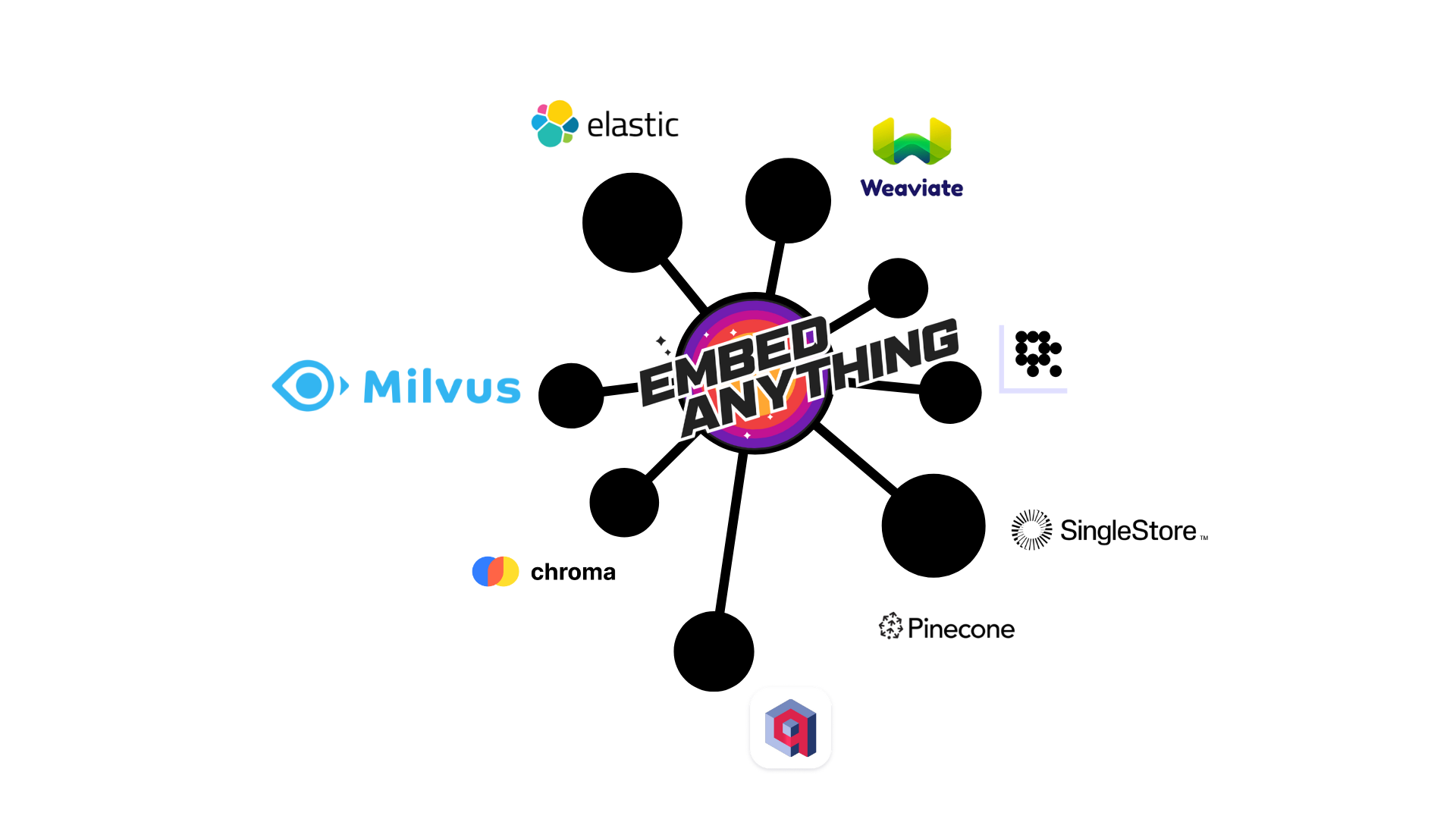
Table of Contents
- No Dependency on Pytorch: Easy to deploy on cloud, comes with low memory footprint.
- Highly Modular : Choose any vectorDB adapter for RAG, with
1 line1 word of code - Candle Backend : Supports BERT, Jina, ColPali, Splade, ModernBERT, Reranker, Qwen
- ONNX Backend : Supports BERT, Jina, ColPali, ColBERT Splade, Reranker, ModernBERT, Qwen
- Cloud Embedding Models: : Supports OpenAI, Cohere, and Gemini.
- MultiModality : Works with text sources like PDFs, txt, md, Images JPG and Audio, .WAV
- GPU support : Hardware acceleration on GPU as well.
- Chunking : In-built chunking methods like semantic, late-chunking
- Vector Streaming: : Separate file processing, Indexing and Inferencing on different threads, reduces latency.
- AWS S3 Bucket: : Directly import AWS S3 bucket files.
- SearchAgent : Example of how you can use index for Searchr1 reasoning.
Embedding models are computationally expensive and time-consuming. By separating document preprocessing from model inference, you can significantly reduce pipeline latency and improve throughput.
Vector streaming transforms a sequential bottleneck into an efficient, concurrent workflow.
The embedding process happens separetly from the main process, so as to maintain high performance enabled by rust MPSC, and no memory leak as embeddings are directly saved to vector database. Find our blog.

➡️Faster execution.
➡️No Pytorch Dependency, thus low-memory footprint and easy to deploy on cloud.
➡️True multithreading
➡️Running embedding models locally and efficiently
➡️In-built chunking methods like semantic, late-chunking
➡️Supports range of models, Dense, Sparse, Late-interaction, ReRanker, ModernBert.
➡️Memory Management: Rust enforces memory management simultaneously, preventing memory leaks and crashes that can plague other languages
We have collaborated with reputed enterprise like Elastic, Weaviate, SingleStore, Milvus and Analytics Vidya Datahours
You can get in touch with us for further collaborations.
Only measures embedding model inference speed, on onnx-runtime. Code
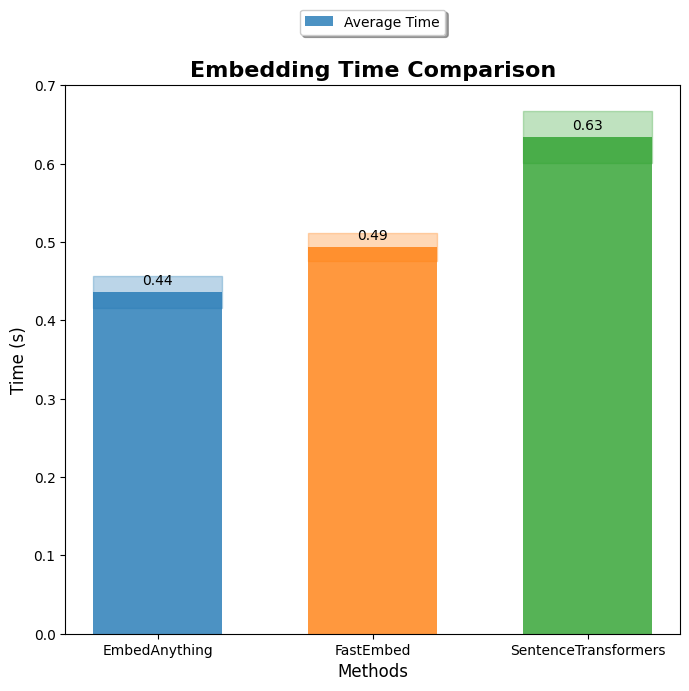
Benchmarks with other fromeworks coming soon!! 🚀
We support any hugging-face models on Candle. And We also support ONNX runtime for BERT and ColPali.
from embed_anything import EmbeddingModel, WhichModel, TextEmbedConfig
import embed_anything

# Load a custom BERT model from Hugging Face
model = EmbeddingModel.from_pretrained_hf(
    model_id="sentence-transformers/all-MiniLM-L12-v2"
)

# Configure embedding parameters
config = TextEmbedConfig(
    chunk_size=1000,      # Maximum characters per chunk
    batch_size=32,        # Number of chunks to process in parallel
    splitting_strategy="sentence"  # How to split text: "sentence", "word", or "semantic"
)

# Embed a file (supports PDF, TXT, MD, etc.)
data = embed_anything.embed_file("path/to/your/file.pdf", embedder=model, config=config)

# Access the embeddings and text
for item in data:
    print(f"Text: {item.text[:100]}...")  # First 100 characters
    print(f"Embedding shape: {len(item.embedding)}")
    print(f"Metadata: {item.metadata}")
print("---" * 20)| Model | HF link |
|---|---|
| Jina | Jina Models |
| Bert | All Bert based models |
| CLIP | openai/clip-* |
| Whisper | OpenAI Whisper models |
| ColPali | starlight-ai/colpali-v1.2-merged-onnx |
| Colbert | answerdotai/answerai-colbert-small-v1, jinaai/jina-colbert-v2 and more |
| Splade | Splade Models and other Splade like models |
| Model2Vec | model2vec, minishlab/potion-base-8M |
| Qwen3-Embedding | Qwen/Qwen3-Embedding-0.6B |
| Reranker | Jina Reranker Models, Xenova/bge-reranker, Qwen/Qwen3-Reranker-4B |
Sparse embeddings are useful for keyword-based retrieval and hybrid search scenarios.
from embed_anything import EmbeddingModel, TextEmbedConfig
import embed_anything

# Load a SPLADE model for sparse embeddings
model = EmbeddingModel.from_pretrained_hf(
    model_id="prithivida/Splade_PP_en_v1"
)

# Configure the embedding process
config = TextEmbedConfig(chunk_size=1000, batch_size=32)

# Embed text files
data = embed_anything.embed_file("test_files/document.txt", embedder=model, config=config)

# Sparse embeddings are useful for hybrid search (combining dense and sparse)
for item in data:
    print(f"Text: {item.text}")
print(f"Sparse embedding (non-zero values): {sum(1 for x in item.embedding if x != 0)}")ONNX models provide faster inference and lower memory usage. Use the ONNXModel enum for pre-configured models or provide a custom model path.
from embed_anything import EmbeddingModel, WhichModel, ONNXModel, Dtype, TextEmbedConfig
import embed_anything

# Option 2: Use a custom ONNX model from Hugging Face
model = EmbeddingModel.from_pretrained_onnx(
    WhichModel.Bert
    model_id="onnx_model_link",
    dtype=Dtype.F16  # Use half precision for faster inference
)Use cloud models for high-quality embeddings without local model deployment.
from embed_anything import EmbeddingModel, WhichModel
import os

# Set your API key
os.environ["COHERE_API_KEY"] = "your-api-key-here"

# Initialize the cloud model
model = EmbeddingModel.from_pretrained_cloud(
    WhichModel.CohereVision,
    model_id="embed-v4.0"
)

# Use it like any other model
data = embed_anything.embed_file("test_files/document.pdf", embedder=model)Semantic chunking preserves meaning by splitting text at semantically meaningful boundaries rather than fixed sizes.
from embed_anything import EmbeddingModel, TextEmbedConfig
import embed_anything

# Main embedding model for generating final embeddings
model = EmbeddingModel.from_pretrained_hf(
    model_id="sentence-transformers/all-MiniLM-L12-v2"
)

# Semantic encoder for determining chunk boundaries
# This model analyzes text to find natural semantic breaks
semantic_encoder = EmbeddingModel.from_pretrained_hf(
    model_id="jinaai/jina-embeddings-v2-small-en"
)

# Configure semantic chunking
config = TextEmbedConfig(
    chunk_size=1000,                    # Target chunk size
    batch_size=32,                      # Batch processing size
    splitting_strategy="semantic",      # Use semantic splitting
    semantic_encoder=semantic_encoder    # Model for semantic analysis
)

# Embed with semantic chunking
data = embed_anything.embed_file("test_files/document.pdf", embedder=model, config=config)

# Chunks will be split at semantically meaningful boundaries
for item in data:
    print(f"Chunk: {item.text[:200]}...")
print("---" * 20)Late-chunking splits text into smaller units first, then combines them during embedding for better context preservation.
from embed_anything import EmbeddingModel, TextEmbedConfig, EmbedData

# Load your embedding model
model = EmbeddingModel.from_pretrained_hf(
    model_id="sentence-transformers/all-MiniLM-L12-v2"
)

# Configure late-chunking
config = TextEmbedConfig(
    chunk_size=1000,              # Maximum chunk size
    batch_size=8,                 # Batch size for processing
    splitting_strategy="sentence", # Split by sentences first
    late_chunking=True,           # Enable late-chunking
)

# Embed a file with late-chunking
data: list[EmbedData] = model.embed_file("test_files/attention.pdf", config=config)

# Late-chunking helps preserve context across sentence boundaries
for item in data:
    print(f"Text: {item.text}")
    print(f"Embedding dimension: {len(item.embedding)}")
print("---" * 20)pip install embed-anything
For GPUs and using special models like ColPali
pip install embed-anything-gpu
🚧❌ If it shows cuda error while running on windowns, run the following command:
os.add_dll_directory("C:/Program Files/NVIDIA GPU Computing Toolkit/CUDA/v12.6/bin")
| End-to-End Retrieval and Reranking using VectorDB Adapters |
| ColPali-Onnx |
| Adapters |
| Qwen3- Embedings |
| Benchmarks |
from embed_anything import EmbeddingModel, WhichModel, TextEmbedConfig
import embed_anything

# Load model
model = EmbeddingModel.from_pretrained_hf(
    model_id="jinaai/jina-embeddings-v2-small-en"
)

# Configure embedding parameters
config = TextEmbedConfig(
    chunk_size=1000,              # Characters per chunk
    batch_size=32,                # Process 32 chunks at once
    buffer_size=64,               # Buffer size for streaming
    splitting_strategy="sentence" # Split by sentences
)

# Embed with custom configuration
data = embed_anything.embed_file(
    "test_files/document.pdf",
    embedder=model,
    config=config
)

# Process embeddings
for item in data:
    print(f"Chunk: {item.text}")
print(f"Metadata: {item.metadata}")# Embed a query
queries = ["What is machine learning?", "How does neural networks work?"]
query_embeddings = embed_anything.embed_query(queries, embedder=model)
# Use embeddings for similarity search
for i, query_emb in enumerate(query_embeddings):
print(f"Query: {queries[i]}")
print(f"Embedding shape: {len(query_emb.embedding)}")# Embed all files in a directory
data = embed_anything.embed_directory(
"test_files/",
embedder=model,
config=config
)
print(f"Total chunks: {len(data)}")For custom or fine-tuned models, specify the Hugging Face model ID and path to the ONNX file:
from embed_anything import EmbeddingModel, WhichModel, Dtype

# Load a custom ONNX model from Hugging Face
model = EmbeddingModel.from_pretrained_onnx(
    WhichModel.Jina,
    hf_model_id="jinaai/jina-embeddings-v2-small-en",
    path_in_repo="model.onnx",  # Path to ONNX file in the repo
    dtype=Dtype.F16              # Use half precision
)

# Use the model
data = embed_anything.embed_file("test_files/document.pdf", embedder=model)Note: Using pre-configured models (via ONNXModel enum) is recommended as these models are tested and optimized. For a complete list of supported ONNX models, see ONNX Models Guide.
The answer is No. EmbedAnything provides you pyo3 bindings, so you can run any function in python without any issues. To contibute you should check out our guidelines and python folder example of adapters.
We provide both backends, candle and onnx. On top of it we also give an end-to-end pipeline, that is you can ingest different data-types and index to any vector database, and inference any model. Fastembed is just an onnx-wrapper.
One of the main reasons is that Candle doesn't require any specific ONNX format models, which means it can work seamlessly with any Hugging Face model. This flexibility has been a key factor for us. However, we also recognize that we’ve been compromising a bit on speed in favor of that flexibility.
First of all, thank you for taking the time to contribute to this project. We truly appreciate your contributions, whether it's bug reports, feature suggestions, or pull requests. Your time and effort are highly valued in this project. 🚀
This document provides guidelines and best practices to help you to contribute effectively. These are meant to serve as guidelines, not strict rules. We encourage you to use your best judgment and feel comfortable proposing changes to this document through a pull request.
One of the aims of EmbedAnything is to allow AI engineers to easily use state of the art embedding models on typical files and documents. A lot has already been accomplished here and these are the formats that we support right now and a few more have to be done.
We’re excited to share that we've expanded our platform to support multiple modalities, including:
-
Audio files
-
Markdowns
-
Websites
-
Images
-
Videos
-
Graph
This gives you the flexibility to work with various data types all in one place! 🌐
We now support both candle and Onnx backend
➡️ Support for GGUF models
We had multimodality from day one for our infrastructure. We have already included it for websites, images and audios but we want to expand it further to.
➡️ Graph embedding -- build deepwalks embeddings depth first and word to vec
➡️ Video Embedding
➡️ Yolo Clip
We currently support a wide range of vector databases for streaming embeddings, including:
- Elastic: thanks to amazing and active Elastic team for the contribution
- Weaviate
- Pinecone
- Qdrant
- Milvus
- Chroma
How to add an adpters: https://starlight-search.com/blog/2024/02/25/adapter-development-guide.md
➡️ Support for S3 bucket
➡️ Support for azure storage
➡️ Support for google drive/dropbox
But we're not stopping there! We're actively working to expand this list.
Want to Contribute? If you’d like to add support for your favorite vector database, we’d love to have your help! Check out our contribution.md for guidelines, or feel free to reach out directly [email protected] . Let's build something amazing together! 💡
- A Rust-based cursor like chat with your codebase tool: https://github.com/timpratim/cargo-chat
- A simple vector-based search engine, also supports ordinary text search : https://github.com/szuwgh/vectorbase2
- Semantic file tracker in CLI operated through daemon built with rust.: https://github.com/sam-salehi/sophist
- FogX-Store is a dataset store service that collects and serves large robotics datasets : https://github.com/J-HowHuang/FogX-Store
- A Dart Wrapper for EmbedAnything Crate: https://github.com/cotw-fabier/embedanythingindart
- Generate embeddings in Rust with tauri on MacOS : https://github.com/do-me/tauri-embedanything-ios
- RAG with EmbedAnything and Milvus: https://milvus.io/docs/v2.5.x/build_RAG_with_milvus_and_embedAnything.md


![@github-actions[bot]](https://avatars.githubusercontent.com/in/15368?s=64&v=4)


